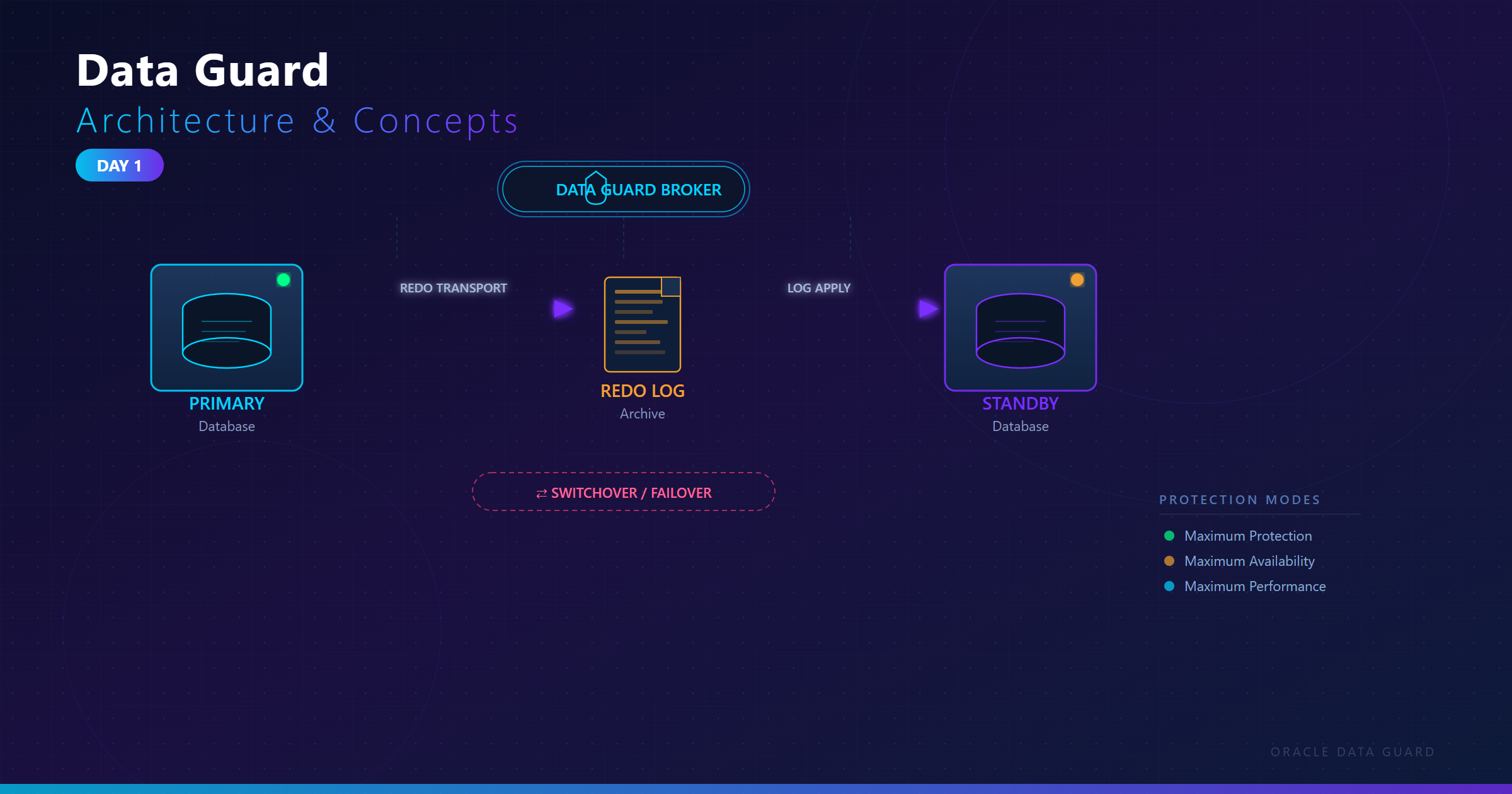
Welcome to Day 1! Let me give you a comprehensive understanding of Oracle Data Guard from the ground up.
Think of it like this:
Primary Database = Your main production database where all work happens
Standby Database = An exact copy that's continuously updated
Data Guard = The technology that keeps them synchronized
Oracle Data Guard is a comprehensive framework that provides:
1. Physical replication of data from primary to standby
2. Automated failover capabilities
3. Role transitions between primary and standby
4. Data protection against failures, disasters, errors, and corruption
Let me explain with a real-world analogy:
The Bank Branch Analogy:
Imagine you have a bank:
Primary Branch (Primary Database):
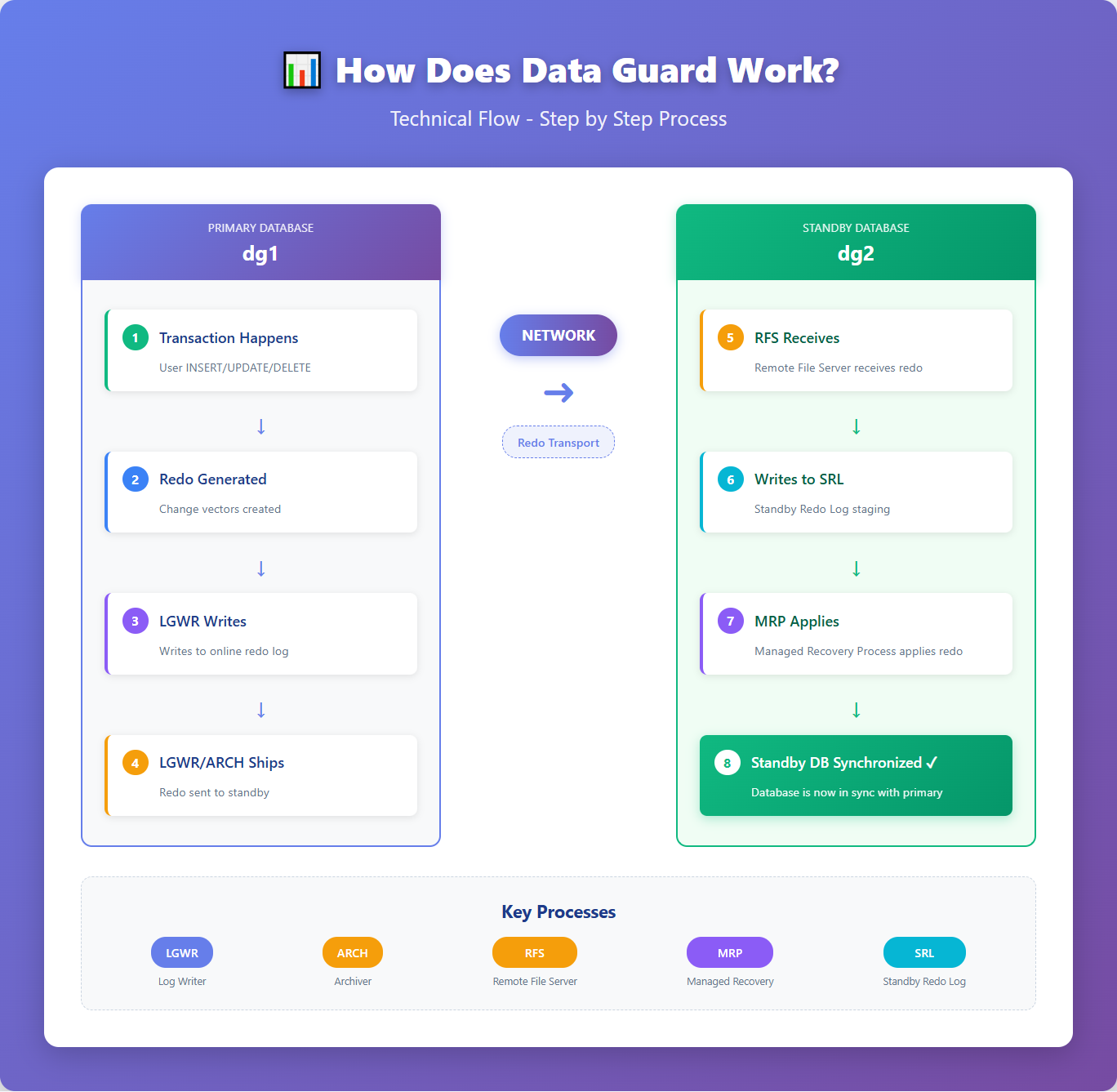
Explanation of Each Step:
1. Transaction Happens: User inserts/updates/deletes data
2. Redo Generated :Oracle generates redo records (change vectors)
3. LGWR Writes: Log Writer process writes to online redo log files
4. Redo Shipped : LGWR (or ARCH) sends redo to standby
Scenario: Datacenter Fire
2. High Availability
Scenario: Operating System Patching
3. Data Protection
Protection Against:
a) User Errors:
With Data Guard + Flashback:
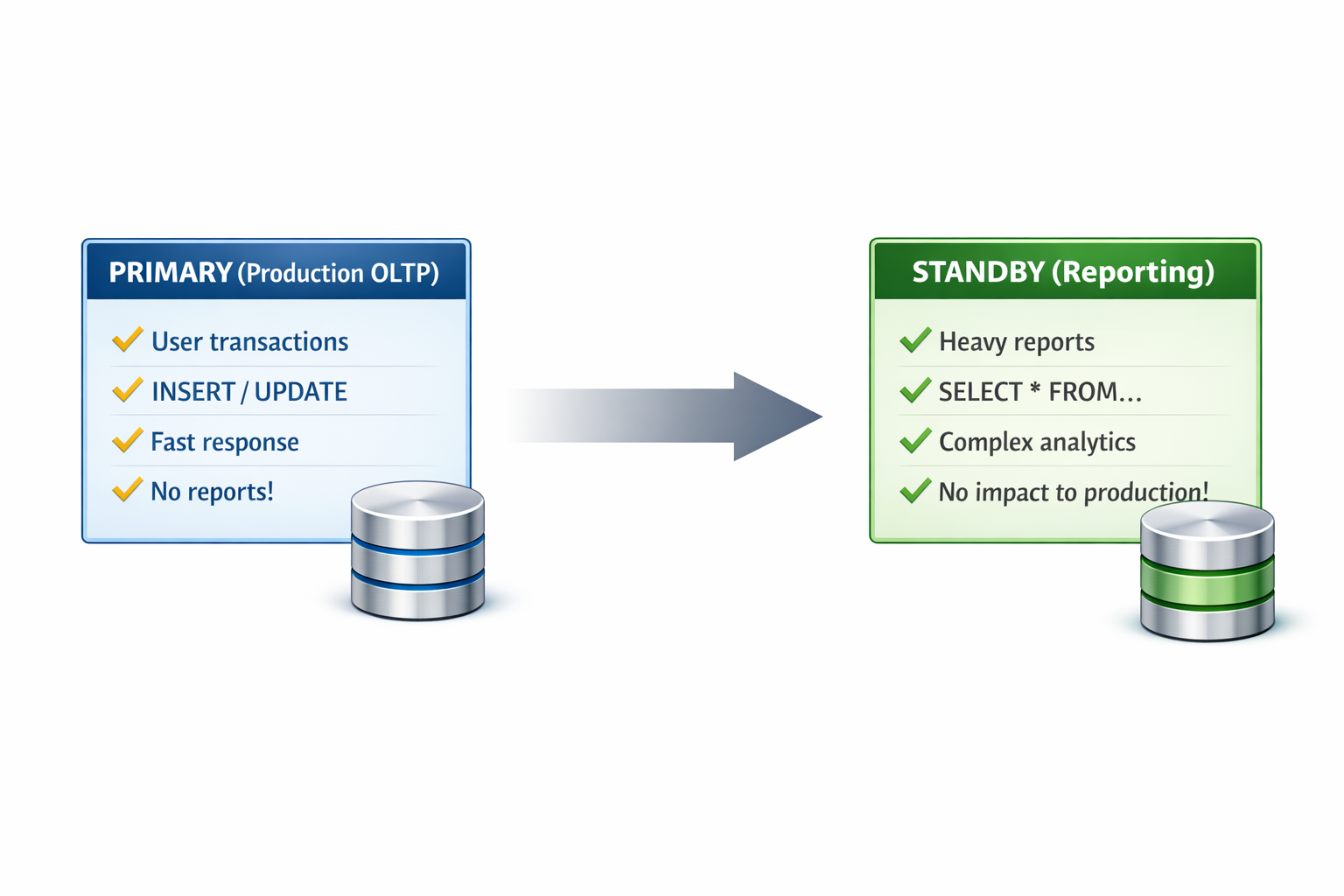
Use standby for READ-ONLY workloads:
Real Example:
Business Requirements:
Data Guard Solution:
Primary: Mumbai datacenter
Standby 1: Bangalore (disaster recovery)
Standby 2: Delhi (reporting)
Benefits:
Zero-downtime patching using switchover
Instant failover if Mumbai fails
Reports run on Delhi without impacting sales
ROI: Prevented ₹20 crore loss in one year
Case 2: Banking Application
Business Requirements:
🎯 What is Oracle Data Guard?
Simple Definition:
Oracle Data Guard is Oracle's disaster recovery and high availability solution that maintains one or more synchronized copies (standby databases) of a production database (primary database).Think of it like this:
Primary Database = Your main production database where all work happens
Standby Database = An exact copy that's continuously updated
Data Guard = The technology that keeps them synchronized
Technical Definition:
Oracle Data Guard is a comprehensive framework that provides:
1. Physical replication of data from primary to standby
2. Automated failover capabilities
3. Role transitions between primary and standby
4. Data protection against failures, disasters, errors, and corruption
🏗️ Architecture Overview
Let me explain with a real-world analogy:
The Bank Branch Analogy:
Imagine you have a bank:
Primary Branch (Primary Database):
- Main branch in Mumbai where all transactions happen
- Customers deposit, withdraw, transfer money
- Every transaction is recorded in the main ledger
- Second branch in Delhi with an identical setup
- Receives copies of all transactions from Mumbai in real-time
- Has the exact same ledger, just slightly behind
- If Mumbai branch burns down, Delhi branch can immediately take over
- Continuously carries transaction records from Mumbai to Delhi
- Uses special secure vehicles (network)
- Ensures no transaction is lost
Explanation of Each Step:
On Primary:
1. Transaction Happens: User inserts/updates/deletes dataINSERT INTO customers VALUES (1, 'John Doe');2. Redo Generated :Oracle generates redo records (change vectors)
- Think of redo as a "recipe" to recreate the change
- Contains: "Add row with ID=1, name='John Doe' to customers table"
3. LGWR Writes: Log Writer process writes to online redo log files
- LGWR is like a journalist recording everything that happens
4. Redo Shipped : LGWR (or ARCH) sends redo to standby
- Like sending a copy of the journal to the backup location
- Can be SYNC (wait for confirmation) or ASYNC (fire and forget)
On Standby:
5. RFS Receives: Remote File Server process receives redo data- Like a mailroom receiving packages
- Staging area before applying changes
- Reads the "recipe" and recreates the exact same changes
- Makes standby identical to primary
🎯 Why Do We Need Data Guard?
1. Disaster Recovery (Primary Reason)Scenario: Datacenter Fire
Without Data Guard: 9:00 AM - Fire destroys primary datacenterFinancial Impact:
9:30 AM - DBA realizes database is gone
10:00 AM - Start restore from last night's backup
2:00 PM - Restore completes
3:00 PM - Apply archive logs (if available)
4:00 PM - Database back online
Result: 7 hours downtime + possible data loss
With Data Guard:
9:00 AM - Fire destroys primary datacenter
9:05 AM - DBA performs failover to standby
9:10 AM - Standby is now primary, accepting transactions
Result: 10 minutes downtime + ZERO data loss
- E-commerce site losing ₹1 crore/hour during outage
- Without DG: ₹7 crores loss
- With DG: ₹17 lakhs loss
- Savings: ₹5.83 crores!
2. High Availability
Scenario: Operating System Patching
Without Data Guard:
Friday 11 PM - Shutdown database
Friday 11:30 PM - Apply OS patches
Saturday 1:30 AM - Reboot server
Saturday 2:00 AM - Start database
Saturday 2:30 AM - Database back online
Downtime: 3.5 hours (during peak hours for global users)
With Data Guard:
Step 1: Patch standby server (no impact to production)
Step 2: Switchover to standby (5 minutes downtime)
Step 3: Patch old primary (now standby)
Step 4: Switchover back if needed (5 minutes)
Total Downtime: 10 minutes (scheduled, controlled)
3. Data Protection
Protection Against:
a) User Errors:
-- Accidental deletion
DELETE FROM orders WHERE status = 'PENDING';
-- Oops! Forgot WHERE clause, deleted ALL orders!- Use standby for point-in-time recovery
- Restore just the affected table
- Minimal impact
- Disk controller failure
- SAN corruption
- Memory errors causing data corruption
- Database bugs
- Application bugs corrupting data
- OS issues
Use standby for READ-ONLY workloads:
Real Example:
- Banking app: Customers doing transactions on primary
- Management running quarterly reports on standby
- Reports don't slow down customer transactions!
💼 Real-World Business Cases
Case 1: E-Commerce Company (Amazon-like)Business Requirements:
- Can't afford ANY downtime during Diwali sale
- Losing ₹50 lakhs per minute of downtime
- Customers expect 24/7 availability
- Need to patch systems monthly
Data Guard Solution:
Primary: Mumbai datacenter
Standby 1: Bangalore (disaster recovery)
Standby 2: Delhi (reporting)
Benefits:
Zero-downtime patching using switchover
Instant failover if Mumbai fails
Reports run on Delhi without impacting sales
ROI: Prevented ₹20 crore loss in one year
Case 2: Banking Application
Business Requirements:
- RBI compliance: Zero data loss tolerance
- 99.99% availability SLA
- Daily regulatory reporting
- Branches across India
- Primary: Chennai (core banking)
- Standby: Mumbai (DR + reporting)
- Protection Mode: Maximum Availability (zero data loss)
- Passed RBI audit with zero data loss guarantee
- Branch reports run on standby (no production impact)
- Survived Chennai floods with 5-minute failover
- Avoided RBI penalties + maintained customer trust
Frequently asked questions
What is the difference between a physical and a logical standby?
A physical standby is a block-for-block copy kept up to date by applying redo (MRP). A logical standby converts the redo into SQL statements and applies them, so it can contain extra tables or indexes, but it supports fewer data types.
What is the difference between SYNC and ASYNC redo transport?
With SYNC, the primary waits for the standby to confirm it received the redo before a commit completes, which gives zero data loss. With ASYNC, the primary does not wait, which is faster but can lose the last few seconds of changes in a failover.
Can I run reports on the standby database?
You can open a physical standby read-only for reports, but redo apply stops while it is open. Keeping it open read-only while redo is applied, so reports see current data, requires the Active Data Guard option.
What is the difference between switchover and failover?
A switchover is a planned role swap with no data loss, and the old primary becomes the new standby. A failover is done when the primary is lost: the standby becomes primary, possibly with some data loss depending on the protection mode.
What do the RFS and MRP processes do?
On the standby, RFS (Remote File Server) receives redo from the primary and writes it to the standby redo logs. MRP (Managed Recovery Process) then applies that redo to the standby database.
Comments
0Please sign in to leave a comment.
No comments yet
Be the first to share your thoughts!